

Are you looking to install or test Windows 11 Pro without immediately activating it? Whether you’re setting up a virtual machine, testing a build, or installing Windows on a new device, having access to Windows 11 Pro keys (and other versions) for testing purposes can be helpful.
Table of Contents
Table of Contents
This 2025 guide includes RTM, OEM, and KMS client setup keys for Windows 11 and Windows 10, which are publicly available generic product keys provided by Microsoft for evaluation purposes only.
🎯 Upgrade to Genuine Windows 11 Pro
Lifetime Activation – Only $13 with Instant Email Delivery.
🔐 Click Here to Buy NowWhat Are Windows Generic Keys?
Generic product keys are special types of activation codes offered by Microsoft to allow users to install Windows without activating it. These keys:
- Allow setup and installation of Windows
- Do not activate the OS permanently
- Are used for testing, evaluation, or volume licensing setup
These keys are not illegal and are frequently used by IT professionals and system builders. However, they do not provide a valid license, and you will still need a genuine Windows product key for full activation.
Windows 11 RTM Generic Product Keys
Here’s a list of Windows 11 RTM (Release to Manufacturing) keys for different editions:
| Windows Version | Product Key |
|---|---|
| Windows 11 Home | YTMG3-N6DKC-DKB77-7M9GH-8HVX7 |
| Windows 11 Home N | 4CPRK-NM3K3-X6XXQ-RXX86-WXCHW |
| Windows 11 Home Single Language | BT79Q-G7N6G-PGBYW-4YWX6-6F4BT |
| Windows 11 Home Country Specific | N2434-X9D7W-8PF6X-8DV9T-8TYMD |
| Windows 11 Pro | VK7JG-NPHTM-C97JM-9MPGT-3V66T |
| Windows 11 Pro N | 2B87N-8KFHP-DKV6R-Y2C8J-PKCKT |
| Windows 11 Pro for Workstations | DXG7C-N36C4-C4HTG-X4T3X-2YV77 |
| Windows 11 Pro Education | 8PTT6-RNW4C-6V7J2-C2D3X-MHBPB |
| Windows 11 Education | YNMGQ-8RYV3-4PGQ3-C8XTP-7CFBY |
| Windows 11 Enterprise | XGVPP-NMH47-7TTHJ-W3FW7-8HV2C |
| Windows 11 Enterprise G | YYVX9-NTFWV-6MDM3-9PT4T-4M68B |
| Windows 11 Enterprise LTSC 2019 | M7XTQ-FN8P6-TTKYV-9D4CC-J462D |
Windows 11 KMS Client Setup Keys
These are KMS (Key Management Service) client setup keys used in corporate volume licensing environments. They require a KMS server to activate:
| Windows Version | KMS Key |
|---|---|
| Windows 11 Home | TX9XD-98N7V-6WMQ6-BX7FG-H8Q99 |
| Windows 11 Pro | W269N-WFGWX-YVC9B-4J6C9-T83GX |
| Windows 11 Enterprise | NPPR9-FWDCX-D2C8J-H872K-2YT43 |
| Windows 11 Education | NW6C2-QMPVW-D7KKK-3GKT6-VCFB2 |
| Windows 11 Pro for Workstations | NRG8B-VKK3Q-CXVCJ-9G2XF-6Q84J |
| Windows 11 Enterprise G | YYVX9-NTFWV-6MDM3-9PT4T-4M68B |
Windows 10 Default Product Keys
Here are the default Windows 10 RTM generic keys for testing:
| Windows Version | Product Key |
|---|---|
| Windows 10 Home | 46J3N-RY6B3-BJFDY-VBFT9-V22HG |
| Windows 10 Pro | RHGJR-N7FVY-Q3B8F-KBQ6V-46YP4 |
| Windows 10 Education | YNMGQ-8RYV3-4PGQ3-C8XTP-7CFBY |
| Windows 10 Enterprise | XGVPP-NMH47-7TTHJ-W3FW7-8HV2C |
Windows 10 KMS Client Setup Keys
| Windows Version | KMS Client Setup Key |
|---|---|
| Windows 10 Home | TX9XD-98N7V-6WMQ6-BX7FG-H8Q99 |
| Windows 10 Home N | 3KHY7-WNT83-DGQKR-F7HPR-844BM |
| Windows 10 Home Single Language | 7HNRX-D7KGG-3K4RQ-4WPJ4-YTDFH |
| Windows 10 Home Country Specific | PVMJN-6DFY6-9CCP6-7BKTT-D3WVR |
| Windows 10 Pro | W269N-WFGWX-YVC9B-4J6C9-T83GX |
| Windows 10 Pro N | MH37W-N47XK-V7XM9-C7227-GCQG9 |
| Windows 10 Pro for Workstations | NRG8B-VKK3Q-CXVCJ-9G2XF-6Q84J |
| Windows 10 Pro N for Workstations | 9FNHH-K3HBT-3W4TD-6383H-6XYWF |
| Windows 10 Education | NW6C2-QMPVW-D7KKK-3GKT6-VCFB2 |
| Windows 10 Education N | 2WH4N-8QGBV-H22JP-CT43Q-MDWWJ |
| Windows 10 Enterprise | NPPR9-FWDCX-D2C8J-H872K-2YT43 |
| Windows 10 Enterprise N | DPH2V-TTNVB-4X9Q3-TJR4H-KHJW4 |
| Windows 10 Enterprise G | YYVX9-NTFWV-6MDM3-9PT4T-4M68B |
| Windows 10 Enterprise G N | 44RPN-FTY23-9VTTB-MP9BX-T84FV |
Why These Keys Don’t Activate Windows Permanently
Generic and KMS setup keys are only meant to facilitate installation or testing. You will still see the “Activate Windows” watermark and experience limited customization options until you enter a genuine Windows 11 Pro product key.
Here’s why they don’t provide full activation:
No Genuine License Linked
- These keys don’t connect to a retail or digital license in Microsoft’s activation servers.
Evaluation-Only Purpose
- Intended to let users install Windows or test its features before purchasing a genuine product key.
Volume Licensing Requirement (for KMS)
- KMS keys require a KMS server to activate, and the activation is temporary (usually 180 days) before renewal.
Limited Feature Access
- You’ll still see the “Activate Windows” watermark and face restrictions on personalization settings like themes, wallpapers, and colors.
Legal Compliance
- Microsoft offers these keys openly, but explicitly states that they do not replace a paid license for long-term use.
How to Buy a Genuine Windows 11 Pro Key
If you’re ready to fully activate your Windows installation and enjoy all features, it’s essential to use a legitimate product key. Here are safe ways to purchase:
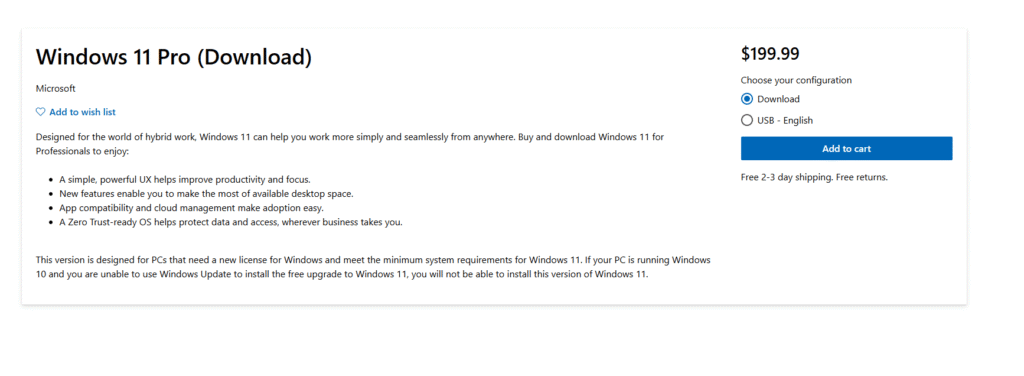
Microsoft Store (Official Source)
- Visit the official Microsoft Store.
- Direct purchase ensures you get an authentic, unused key linked to your Microsoft account.
- Price is higher, but you’re guaranteed lifetime validity.
Authorized Resellers
- Trusted online platforms like Newegg, Amazon and Kinguin often sell legitimate OEM or retail keys at discounted prices.
- Always check seller ratings and customer reviews before purchasing.
Microsoft Partners & IT Providers
- Many IT service providers and Microsoft Partner companies sell volume or retail keys with proper documentation.
- Especially useful for businesses and bulk purchases.
Pro Tip: Avoid suspiciously cheap keys from untrusted sellers, as many are pirated or reused.
FAQs
Q1: Are these product keys illegal to use?
A: No. These are public, official testing keys from Microsoft and are safe for evaluation use.
Q2: Can I activate Windows permanently using these keys?
A: No. These are not permanent activation keys. For that, you need to buy a genuine license.
Q3: Can I upgrade from Home to Pro using these keys?
A: You can initiate the upgrade, but you’ll still need a valid Pro key to activate it.
Q4: Will my PC work normally without activation?
Yes, Windows will work, but you’ll see an “Activate Windows” watermark and have limited personalization options until it’s activated.
Q5: What’s the difference between RTM keys and KMS keys?
- RTM Keys: Used for installation of Windows editions without activation; mainly for system setup or evaluation.
- KMS Keys: Used in enterprise environments to activate PCs via a Key Management Service server on a local network.
Q6: Can I reuse a genuine retail Windows key on another PC?
Yes, retail keys can be transferred to a new PC (one at a time), but OEM keys are locked to the first computer they’re activated on.
Q7: Is it safe to buy cheap keys from online marketplaces?
Be cautious. Some cheap keys are pirated, volume-licensed without permission, or reused. Always buy from Microsoft, authorized resellers, or trusted high-rated sellers.
Q8: Do these keys work for both 32-bit and 64-bit versions of Windows?
Yes. Microsoft generic keys work for both 32-bit and 64-bit installations, as long as they match the edition (Home, Pro, Enterprise, etc.).
Q9: Will these keys work after a fresh reinstall of Windows?
Yes. You can use the same generic key again after reinstalling Windows for testing, but it still won’t give you permanent activation.
Q10: Can I activate Windows offline using these keys?
No. Generic keys require an internet connection for setup, and activation still requires a valid genuine key or a KMS server in enterprise environments.
Disclaimer
This article is for educational and informational purposes only. The product keys shared are publicly available generic installation keys offered by Microsoft for testing and setup. We do not promote or support software piracy. If you’re looking for a valid and legal activation, always buy from Microsoft or trusted partners.
Final Thoughts
Using Microsoft’s generic product keys is a quick and legitimate way to install or test Windows 11 Pro or Windows 10 in 2025 without purchasing a license right away. These keys are especially useful for IT professionals, system builders, and enthusiasts who want to set up multiple systems for evaluation.
However, remember that these keys are not a substitute for a genuine license. Without activation, you’ll see the “Activate Windows” watermark and lose access to certain customization features. For the best experience, security updates, and full functionality, always purchase a valid license from Microsoft or trusted partners.
A genuine key ensures that your system remains legal, secure, and fully functional and it’s a small investment compared to the benefits it offers in the long run.

Need help with your website?
Stacksole provides web development, ecommerce development, WordPress development, SEO and digital marketing services for businesses in the UK and worldwide.